Use the Automation tab to see how an Automation’s Agents and Queues hand work to each other, add new ones, and open each one to change it.
The Automation tab, under Manage in an Automation’s navigation, shows every Agent and Queue in the Automation and how work moves between them. The navigation also lists them by name under Agents and Queues, so you can jump straight to one.
Flow view
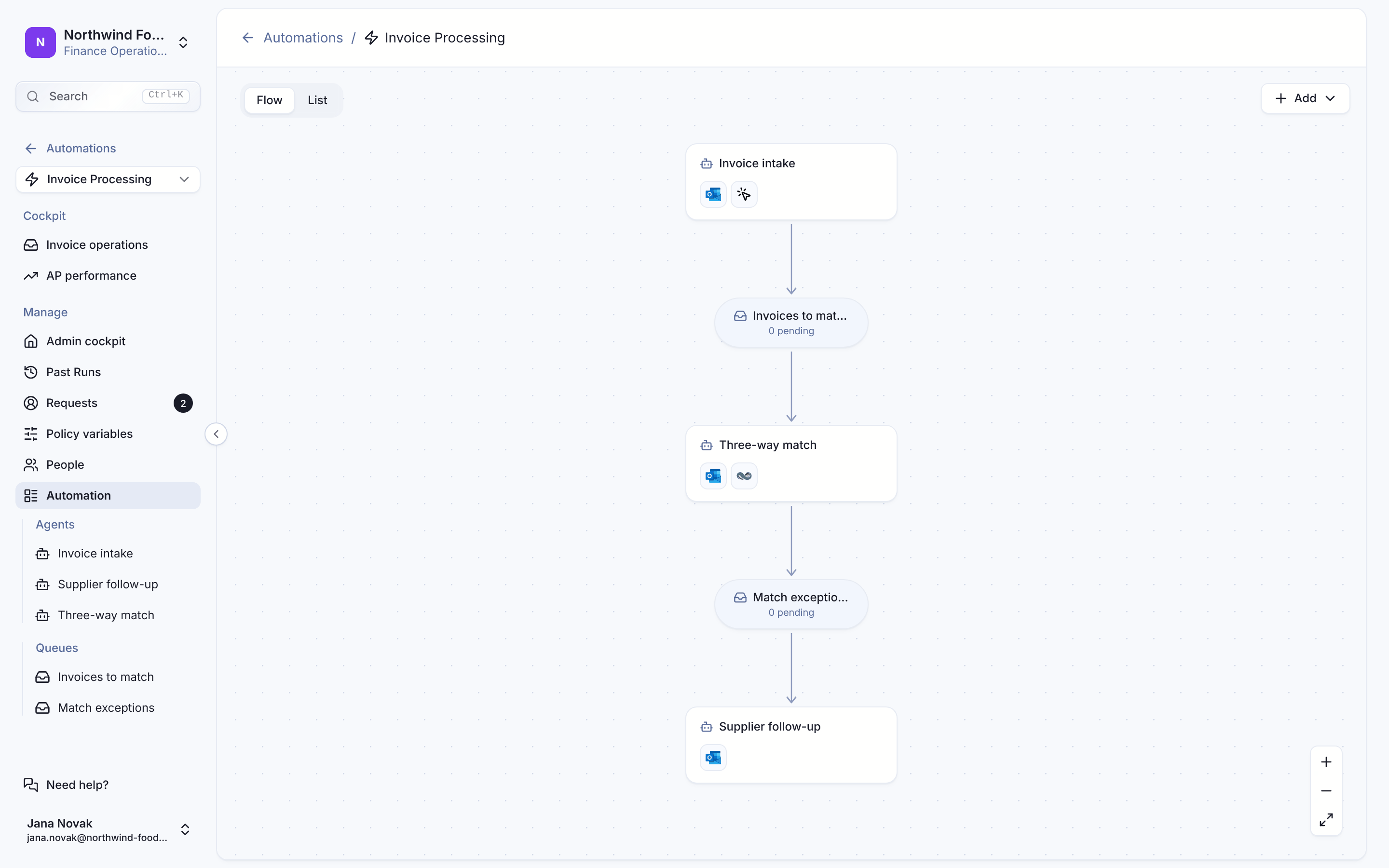
Flow draws the process as a graph. Agents are boxes with the icons of the Connections they use; Queues are the rounded boxes between them, with the number of Cases waiting. Arrows show where an Agent adds Cases and which Agent processes them.
Click an Agent or Queue to open its details beside the graph. The rest of the flow fades, so you can see what it connects to.
An Agent’s pane shows its Connections, its Queues (which it Adds cases to and which it Processes cases from), its Schedules & Triggers and its AOP. A Queue’s pane shows which Agents Add cases and which Process cases. Click Edit to open the Agent’s full page.Use the zoom controls in the corner to zoom in, out, or fit the whole flow.
List view
List shows the same members as two tables with their numbers.
Table
Columns
Agents
Schedule & Triggers, Created by, Total Runs, Needs Input, Critical, Failed, Success Rate
Queue
Adds cases, Processes cases, Total Cases, Pending, Postponed, In Progress, Needs Input, Critical, Failed, Success Rate
Use the list to spot the step that fails most or the Queue where work piles up.
Add Agents and Queues
Click Add at the top of the tab.
Create new agent adds an Agent to this Automation and opens it so you can write its AOP.
Create new queue adds a Queue to this Automation.
To connect them, open the Agent and use the Queue section of its setup: choose a Queue the Agent adds Cases to, a Queue whose Cases it processes, or both. An Agent that processes a Queue has a Run on new cases trigger under Triggers. Turn it on so the Agent starts whenever a Case arrives.In the list view, a member’s … menu renames it or deletes it.
On this tab, deleting an Agent or Queue deletes it from your team, not only from the Automation. It stops running at once.
Open an Agent
Click an Agent in the navigation, the flow or the list to open its page inside the Automation. It’s the same Agent page you know from Building Agents, with Configuration, Memory, Past Runs, Evaluations and My Settings tabs, and the breadcrumb shows the Automation it belongs to.
The Agent receives the Automation’s Policy variables that its AOP mentions with @ or that are turned on in the Policy section of its setup, such as the Price tolerance and Auto-approve threshold this AOP works with. Use Run Agent to start a Run by hand.
Open a Queue
Click a Queue to open its Cases.
The header shows which Agents add Cases to the Queue and which process them. The counters below filter the list by status: Pending, Postponed, Canceled, In progress, Needs input, Failed and Completed. Search and Add filter narrow it further. Open a Case to see its data and history. Queue explains Case statuses and operations in detail.
Related
Past Runs and Requests
Follow the work the Agents did.
Queue
Case statuses, triggers and operations.
Was this page helpful?
{"docsConfig":{"theme":"mint","$schema":"https://mintlify.com/docs.json","name":"Duvo","description":"Build, run, and monitor autonomous AI agents that execute real work.","colors":{"primary":"#2A2B3B","light":"#FFDD04","dark":"#1C1D27"},"logo":{"light":"https://mintcdn.com/duvo-d8027998/8b4fixYu1Y0uZIEZ/duvo-logo-light.svg?fit=max\u0026auto=format\u0026n=8b4fixYu1Y0uZIEZ\u0026q=85\u0026s=599a585a43d4918423b59534308abbeb","dark":"https://mintcdn.com/duvo-d8027998/8b4fixYu1Y0uZIEZ/duvo-logo-dark.svg?fit=max\u0026auto=format\u0026n=8b4fixYu1Y0uZIEZ\u0026q=85\u0026s=224510034e5a21688e91d5accd27f4e0","href":"https://duvo.ai"},"favicon":"https://mintcdn.com/duvo-d8027998/8b4fixYu1Y0uZIEZ/duvo-favicon.png?fit=max\u0026auto=format\u0026n=8b4fixYu1Y0uZIEZ\u0026q=85\u0026s=e728b3b524d5c2bd6b232a7552461025","appearance":{"default":"light"},"background":{"color":{"light":"#FDFCFA","dark":"#1C1D27"}},"navbar":{"links":[{"href":"mailto:support@duvo.ai","label":"Support"}],"primary":{"type":"button","label":"Dashboard","href":"https://app.duvo.ai"}},"footer":{"socials":{"x":"https://x.com/duvoai","github":"https://github.com/duvoai","linkedin":"https://linkedin.com/company/duvoai"}},"fonts":{"heading":{"family":"Inter Tight"},"body":{"family":"Inter"}},"icons":{"library":"lucide"},"styling":{"codeblocks":"dark","latex":true},"contextual":{"options":["copy","view","claude","chatgpt","mcp","cursor","vscode"],"display":"header"},"thumbnails":{"appearance":"dark","background":"https://mintcdn.com/duvo-d8027998/MM0uVEUMSg69_fu0/og-background.png?fit=max\u0026auto=format\u0026n=MM0uVEUMSg69_fu0\u0026q=85\u0026s=e7651c6001c355a60afc6d9ebd8ba7b2"},"interaction":{"drilldown":false},"navigation":{"pages":[]}},"deployment":{"deploymentMetadataValue":{"subdomain":"duvo-d8027998","hasAudioNarration":false,"actualSubdomain":"duvo-d8027998","customDomains":["docs.duvo.ai"],"gitSource":{"type":"github","owner":"duvoai","repo":"monorepo","deployBranch":"staging","contentDirectory":"docs/mintlify","isPrivate":true,"mountPath":"","label":""},"feedback":{"agentFeedback":true,"thumbs":true},"entitlements":{"AI_CHAT":{"status":"ENABLED"},"WEB_MCP":{"status":"ENABLED"},"NARRATION":{"status":"ENABLED"}},"buildId":"6b0c055f245860989203e01a","clientVersion":"0.0.4344","searchFilterCounts":[{"language":"default","tag":"API Reference","count":411},{"language":"default","tag":"User Guide","count":176},{"language":"default","tag":"Connections","count":81},{"language":"default","tag":"Automations","count":59},{"language":"default","tag":"Clarity","count":54},{"language":"default","tag":"Skills","count":38},{"language":"default","tag":"Duvo Pulse","count":31},{"language":"default","tag":"Organizations","count":27},{"language":"default","tag":"Queues","count":26},{"language":"default","tag":"ClarityV2","count":25}]},"assistantConfig":{"enableAskAiButton":false,"enableStarterQuestions":false,"enableContextualStarterQuestions":false,"enableAskAiSearchBar":true,"deflection":{"enabled":true,"email":"support@duvo.ai"}},"basePath":"","hasChatPermissions":true,"hasWebMcpPermissions":true,"toggles":[{"name":"kill-isr","enabled":true,"variant":{"name":"disabled","enabled":false,"feature_enabled":true},"impressionData":false},{"name":"custom-rbac-roles","enabled":true,"variant":{"name":"disabled","enabled":false,"feature_enabled":true},"impressionData":false},{"name":"agent-mintlify-slack","enabled":true,"variant":{"name":"disabled","enabled":false,"feature_enabled":true},"impressionData":false},{"name":"agent-integrations-settings","enabled":true,"variant":{"name":"disabled","enabled":false,"feature_enabled":true},"impressionData":false},{"name":"rbac-expansion","enabled":true,"variant":{"name":"disabled","enabled":false,"feature_enabled":true},"impressionData":false},{"name":"automations-pr-grouping","enabled":true,"variant":{"name":"disabled","enabled":false,"feature_enabled":true},"impressionData":false},{"name":"custom-prefix","enabled":true,"variant":{"name":"disabled","enabled":false,"feature_enabled":true},"impressionData":false},{"name":"analytics-v7","enabled":true,"variant":{"name":"disabled","enabled":false,"feature_enabled":true},"impressionData":false},{"name":"user-flows-analytics","enabled":true,"variant":{"name":"disabled","enabled":false,"feature_enabled":true},"impressionData":false},{"name":"no-publish-flow","enabled":true,"variant":{"name":"disabled","enabled":false,"feature_enabled":true},"impressionData":false},{"name":"snapshot-serving-live","enabled":true,"variant":{"name":"disabled","enabled":false,"feature_enabled":true},"impressionData":false},{"name":"stripTemperatureMiddleware","enabled":true,"variant":{"name":"disabled","enabled":false,"feature_enabled":true},"impressionData":false},{"name":"support-platform-pylon-zendesk","enabled":true,"variant":{"name":"disabled","enabled":false,"feature_enabled":true},"impressionData":false},{"name":"snapshot-serving","enabled":true,"variant":{"name":"disabled","enabled":false,"feature_enabled":true},"impressionData":false},{"name":"instant-rollback","enabled":true,"variant":{"name":"disabled","enabled":false,"feature_enabled":true},"impressionData":false},{"name":"granular-notifications-server","enabled":true,"variant":{"name":"disabled","enabled":false,"feature_enabled":true},"impressionData":false},{"name":"granular-notifications","enabled":true,"variant":{"name":"disabled","enabled":false,"feature_enabled":true},"impressionData":false},{"name":"automations-fable","enabled":true,"variant":{"name":"disabled","enabled":false,"feature_enabled":true},"impressionData":false},{"name":"fixed-ai-action-pricing","enabled":true,"variant":{"name":"disabled","enabled":false,"feature_enabled":true},"impressionData":false},{"name":"site-roles","enabled":true,"variant":{"name":"disabled","enabled":false,"feature_enabled":true},"impressionData":false},{"name":"automation-resolve-merge-conflict","enabled":true,"variant":{"name":"disabled","enabled":false,"feature_enabled":true},"impressionData":false},{"name":"scoped-publishing","enabled":true,"variant":{"name":"disabled","enabled":false,"feature_enabled":true},"impressionData":false},{"name":"mintql","enabled":true,"variant":{"name":"disabled","enabled":false,"feature_enabled":true},"impressionData":false},{"name":"page-level-analytics","enabled":true,"variant":{"name":"disabled","enabled":false,"feature_enabled":true},"impressionData":false},{"name":"editor-version-history-v2","enabled":true,"variant":{"name":"disabled","enabled":false,"feature_enabled":true},"impressionData":false},{"name":"billing-page-v2","enabled":true,"variant":{"name":"disabled","enabled":false,"feature_enabled":true},"impressionData":false},{"name":"full-page-search","enabled":true,"variant":{"name":"disabled","enabled":false,"feature_enabled":true},"impressionData":false},{"name":"workspace-projects","enabled":true,"variant":{"name":"disabled","enabled":false,"feature_enabled":true},"impressionData":false},{"name":"fork-pr-previews","enabled":true,"variant":{"name":"disabled","enabled":false,"feature_enabled":true},"impressionData":false},{"name":"revalidation-jwt","enabled":true,"variant":{"name":"disabled","enabled":false,"feature_enabled":true},"impressionData":false},{"name":"hobby-abuse-scan","enabled":true,"variant":{"name":"disabled","enabled":false,"feature_enabled":true},"impressionData":false},{"name":"dashboard-inbox","enabled":true,"variant":{"name":"disabled","enabled":false,"feature_enabled":true},"impressionData":false},{"name":"turbopuffer-dual-write","enabled":true,"variant":{"name":"disabled","enabled":false,"feature_enabled":true},"impressionData":false},{"name":"approve-review-flow","enabled":true,"variant":{"name":"disabled","enabled":false,"feature_enabled":true},"impressionData":false},{"name":"editor-metadata","enabled":true,"variant":{"name":"disabled","enabled":false,"feature_enabled":true},"impressionData":false},{"name":"turbopuffer-serve","enabled":true,"variant":{"name":"disabled","enabled":false,"feature_enabled":true},"impressionData":false},{"name":"live-agents","enabled":true,"variant":{"name":"disabled","enabled":false,"feature_enabled":true},"impressionData":false},{"name":"starter-pricing","enabled":true,"variant":{"name":"treatment","enabled":true,"payload":{"type":"string","value":"treatment"},"feature_enabled":true},"impressionData":false},{"name":"llms-txt-v2","enabled":true,"variant":{"name":"disabled","enabled":false,"feature_enabled":true},"impressionData":false},{"name":"wildcard-email-auth","enabled":true,"variant":{"name":"disabled","enabled":false,"feature_enabled":true},"impressionData":false}],"starterQuestions":[],"googleFontsInlined":true},"customCss":[{"filePath":"style.css","content":"/* latin-ext */\n@font-face {\n font-family: 'DM Mono';\n font-style: normal;\n font-weight: 400;\n font-display: swap;\n src: url(/_mintlify/assets/fonts/google/s/dmmono/v16/aFTU7PB1QTsUX8KYthSQBLyM.woff2) format('woff2');\n unicode-range: U+0100-02BA, U+02BD-02C5, U+02C7-02CC, U+02CE-02D7, U+02DD-02FF, U+0304, U+0308, U+0329, U+1D00-1DBF, U+1E00-1E9F, U+1EF2-1EFF, U+2020, U+20A0-20AB, U+20AD-20C4, U+2113, U+2C60-2C7F, U+A720-A7FF;\n}\n/* latin */\n@font-face {\n font-family: 'DM Mono';\n font-style: normal;\n font-weight: 400;\n font-display: swap;\n src: url(/_mintlify/assets/fonts/google/s/dmmono/v16/aFTU7PB1QTsUX8KYthqQBA.woff2) format('woff2');\n unicode-range: U+0000-00FF, U+0131, U+0152-0153, U+02BB-02BC, U+02C6, U+02DA, U+02DC, U+0304, U+0308, U+0329, U+2000-206F, U+20AC, U+2122, U+2191, U+2193, U+2212, U+2215, U+FEFF, U+FFFD;\n}\n/* latin-ext */\n@font-face {\n font-family: 'DM Mono';\n font-style: normal;\n font-weight: 500;\n font-display: swap;\n src: url(/_mintlify/assets/fonts/google/s/dmmono/v16/aFTR7PB1QTsUX8KYvumzEY2tbZX9.woff2) format('woff2');\n unicode-range: U+0100-02BA, U+02BD-02C5, U+02C7-02CC, U+02CE-02D7, U+02DD-02FF, U+0304, U+0308, U+0329, U+1D00-1DBF, U+1E00-1E9F, U+1EF2-1EFF, U+2020, U+20A0-20AB, U+20AD-20C4, U+2113, U+2C60-2C7F, U+A720-A7FF;\n}\n/* latin */\n@font-face {\n font-family: 'DM Mono';\n font-style: normal;\n font-weight: 500;\n font-display: swap;\n src: url(/_mintlify/assets/fonts/google/s/dmmono/v16/aFTR7PB1QTsUX8KYvumzEYOtbQ.woff2) format('woff2');\n unicode-range: U+0000-00FF, U+0131, U+0152-0153, U+02BB-02BC, U+02C6, U+02DA, U+02DC, U+0304, U+0308, U+0329, U+2000-206F, U+20AC, U+2122, U+2191, U+2193, U+2212, U+2215, U+FEFF, U+FFFD;\n}\nbody{background:radial-gradient(\n circle at 10% 8%,\n rgba(255, 221, 4, 0.08) 0%,\n rgba(255, 221, 4, 0) 26%\n ),\n radial-gradient(\n circle at 100% 18%,\n rgba(95, 229, 215, 0.07) 0%,\n rgba(95, 229, 215, 0) 24%\n ),\n #fdfcfa}.dark body{background:radial-gradient(\n circle at 12% 10%,\n rgba(255, 221, 4, 0.06) 0%,\n rgba(255, 221, 4, 0) 30%\n ),\n radial-gradient(\n circle at 88% 16%,\n rgba(95, 229, 215, 0.05) 0%,\n rgba(95, 229, 215, 0) 26%\n ),\n #1c1d27}::selection{background:rgba(255, 221, 4, 0.35);color:#2a2b3b}code,pre,kbd,.font-mono{font-family:\"DM Mono\", ui-monospace, SFMono-Regular, Menlo, Consolas, monospace}html:not(.dark) :is(p,li,dd,dt,td,th,blockquote,summary,label){color:#1c1d27}html:not(.dark) :is(h1,h2,h3,h4,h5,h6){color:#0f0f15}html:not(.dark) :is(input,textarea,select){color:#1c1d27;border-color:rgba(42, 43, 59, 0.32)}html:not(.dark) :is(input,textarea)::placeholder{color:rgba(42, 43, 59, 0.62)}.dark img[src*=\"/images/connections/\"]{background:#ffffff;border-radius:6px;padding:3px;box-sizing:border-box}[data-component-part=\"update-label\"]{background:rgba(255, 221, 4, 0.3);color:#2a2b3b;font-weight:600}.dark [data-component-part=\"update-label\"]{background:rgba(255, 221, 4, 0.14);color:#ffdd04}[data-component-part=\"update-description\"]{font-family:\"DM Mono\", ui-monospace, SFMono-Regular, Menlo, monospace;font-size:0.75rem;letter-spacing:0.02em}[data-component-part=\"update-tag-list\"]{gap:6px}[data-component-part=\"update-tag\"]{background:rgba(42, 43, 59, 0.05);border:1px solid rgba(42, 43, 59, 0.12);color:#2a2b3b;border-radius:9999px;padding:1px 10px;font-size:0.72rem;font-weight:500}.dark [data-component-part=\"update-tag\"]{background:rgba(242, 243, 246, 0.06);border-color:rgba(242, 243, 246, 0.16);color:#f2f3f6}"}]}
{"page":{"pagePath":"user-guide/automations/agents-and-queues","slug":"/user-guide/automations/agents-and-queues","pageMetadata":{"title":"Agents and Queues","description":"Use the Automation tab to see how an Automation's Agents and Queues hand work to each other, add new ones, and open each one to change it.","href":"/user-guide/automations/agents-and-queues"},"description":{"compiledSource":"\"use strict\";\nconst {jsx: _jsx} = arguments[0];\nconst {useMDXComponents: _provideComponents} = arguments[0];\nfunction _createMdxContent(props) {\n const _components = {\n p: \"p\",\n ..._provideComponents(),\n ...props.components\n };\n return _jsx(_components.p, {\n children: \"Use the Automation tab to see how an Automation’s Agents and Queues hand work to each other, add new ones, and open each one to change it.\"\n });\n}\nfunction MDXContent(props = {}) {\n const {wrapper: MDXLayout} = {\n ..._provideComponents(),\n ...props.components\n };\n return MDXLayout ? _jsx(MDXLayout, {\n ...props,\n children: _jsx(_createMdxContent, {\n ...props\n })\n }) : _createMdxContent(props);\n}\nreturn {\n default: MDXContent\n};\n","frontmatter":{},"scope":{}},"pageType":"default","mdx":{"mdxSource":{"compiledSource":"\"use strict\";const{Fragment:_Fragment,jsx:_jsx,jsxs:_jsxs}=arguments[0];const{useMDXComponents:_provideComponents}=arguments[0];function _createMdxContent(props){const _components={a:`a`,code:`code`,li:`li`,p:`p`,strong:`strong`,tbody:`tbody`,td:`td`,th:`th`,thead:`thead`,tr:`tr`,ul:`ul`,..._provideComponents(),...props.components},{Card,CardGroup,Frame,Heading,OptimizedImage,Table,Warning}=_components;if(!Card)_missingMdxReference(`Card`,true);if(!CardGroup)_missingMdxReference(`CardGroup`,true);if(!Frame)_missingMdxReference(`Frame`,true);if(!Heading)_missingMdxReference(`Heading`,true);if(!OptimizedImage)_missingMdxReference(`OptimizedImage`,true);if(!Table)_missingMdxReference(`Table`,true);if(!Warning)_missingMdxReference(`Warning`,true);return _jsxs(_Fragment,{children:[_jsxs(_components.p,{children:[`The `,_jsx(_components.strong,{children:`Automation`}),` tab, under `,_jsx(_components.strong,{children:`Manage`}),` in an Automation’s navigation, shows every Agent and Queue in the Automation and how work moves between them. The navigation also lists them by name under `,_jsx(_components.strong,{children:`Agents`}),` and `,_jsx(_components.strong,{children:`Queues`}),`, so you can jump straight to one.`]}),`\n`,_jsx(Heading,{level:`2`,id:`flow-view`,children:`Flow view`}),`\n`,_jsxs(_components.p,{children:[_jsx(_components.strong,{children:`Flow`}),` draws the process as a graph. Agents are boxes with the icons of the Connections they use; Queues are the rounded boxes between them, with the number of Cases waiting. Arrows show where an Agent adds Cases and which Agent processes them.`]}),`\n`,_jsx(Frame,{children:_jsx(OptimizedImage,{src:`https://mintcdn.com/duvo-d8027998/huqI5JuROcROFtIE/images/user-guide/automations/automation-tab-flow.png?fit=max\u0026auto=format\u0026n=huqI5JuROcROFtIE\u0026q=85\u0026s=847044d167145031f3bf0f534b32ca31`,alt:`The flow of Invoice Processing: Invoice intake adds Cases to Invoices to match, Three-way match processes them and adds exceptions to Match exceptions, which Supplier follow-up processes`,\"data-og-width\":`2880`,width:`2880`,\"data-og-height\":`1800`,height:`1800`,\"data-path\":`images/user-guide/automations/automation-tab-flow.png`,\"data-optimize\":`true`,\"data-opv\":`3`,srcset:`https://mintcdn.com/duvo-d8027998/huqI5JuROcROFtIE/images/user-guide/automations/automation-tab-flow.png?w=280\u0026fit=max\u0026auto=format\u0026n=huqI5JuROcROFtIE\u0026q=85\u0026s=1b34b72e2294808d0ee392696886d32d 280w, https://mintcdn.com/duvo-d8027998/huqI5JuROcROFtIE/images/user-guide/automations/automation-tab-flow.png?w=560\u0026fit=max\u0026auto=format\u0026n=huqI5JuROcROFtIE\u0026q=85\u0026s=f91b90730574db45a245535b7850dde2 560w, https://mintcdn.com/duvo-d8027998/huqI5JuROcROFtIE/images/user-guide/automations/automation-tab-flow.png?w=840\u0026fit=max\u0026auto=format\u0026n=huqI5JuROcROFtIE\u0026q=85\u0026s=0dfa178c2b2249cf94b6cd172a65ecba 840w, https://mintcdn.com/duvo-d8027998/huqI5JuROcROFtIE/images/user-guide/automations/automation-tab-flow.png?w=1100\u0026fit=max\u0026auto=format\u0026n=huqI5JuROcROFtIE\u0026q=85\u0026s=68cf7472ef93c81e2f4e60e32b91047a 1100w, https://mintcdn.com/duvo-d8027998/huqI5JuROcROFtIE/images/user-guide/automations/automation-tab-flow.png?w=1650\u0026fit=max\u0026auto=format\u0026n=huqI5JuROcROFtIE\u0026q=85\u0026s=26cc5e23af8910059131250679c18e82 1650w, https://mintcdn.com/duvo-d8027998/huqI5JuROcROFtIE/images/user-guide/automations/automation-tab-flow.png?w=2500\u0026fit=max\u0026auto=format\u0026n=huqI5JuROcROFtIE\u0026q=85\u0026s=b2f28eae6b584db532f1521561aa861a 2500w`})}),`\n`,_jsx(_components.p,{children:`Click an Agent or Queue to open its details beside the graph. The rest of the flow fades, so you can see what it connects to.`}),`\n`,_jsx(Frame,{children:_jsx(OptimizedImage,{src:`https://mintcdn.com/duvo-d8027998/huqI5JuROcROFtIE/images/user-guide/automations/automation-tab-agent-pane.png?fit=max\u0026auto=format\u0026n=huqI5JuROcROFtIE\u0026q=85\u0026s=ba579909990518eb84057f06c3e40499`,alt:`The Three-way match Agent selected in the flow, with a side pane listing its Connections, the Queues it adds to and processes, its trigger and its AOP`,\"data-og-width\":`2880`,width:`2880`,\"data-og-height\":`1800`,height:`1800`,\"data-path\":`images/user-guide/automations/automation-tab-agent-pane.png`,\"data-optimize\":`true`,\"data-opv\":`3`,srcset:`https://mintcdn.com/duvo-d8027998/huqI5JuROcROFtIE/images/user-guide/automations/automation-tab-agent-pane.png?w=280\u0026fit=max\u0026auto=format\u0026n=huqI5JuROcROFtIE\u0026q=85\u0026s=a37632e67039ffc286fe425a70fe397a 280w, https://mintcdn.com/duvo-d8027998/huqI5JuROcROFtIE/images/user-guide/automations/automation-tab-agent-pane.png?w=560\u0026fit=max\u0026auto=format\u0026n=huqI5JuROcROFtIE\u0026q=85\u0026s=36385af7faf204a86714d81a9be3fd55 560w, https://mintcdn.com/duvo-d8027998/huqI5JuROcROFtIE/images/user-guide/automations/automation-tab-agent-pane.png?w=840\u0026fit=max\u0026auto=format\u0026n=huqI5JuROcROFtIE\u0026q=85\u0026s=00af73ec4c0cc8a75edda1d58fbecc46 840w, https://mintcdn.com/duvo-d8027998/huqI5JuROcROFtIE/images/user-guide/automations/automation-tab-agent-pane.png?w=1100\u0026fit=max\u0026auto=format\u0026n=huqI5JuROcROFtIE\u0026q=85\u0026s=d88a7cc4f80d2dcfcb2713c2f723b63b 1100w, https://mintcdn.com/duvo-d8027998/huqI5JuROcROFtIE/images/user-guide/automations/automation-tab-agent-pane.png?w=1650\u0026fit=max\u0026auto=format\u0026n=huqI5JuROcROFtIE\u0026q=85\u0026s=67ab71431795ba9b30ae75bb0aa9cb26 1650w, https://mintcdn.com/duvo-d8027998/huqI5JuROcROFtIE/images/user-guide/automations/automation-tab-agent-pane.png?w=2500\u0026fit=max\u0026auto=format\u0026n=huqI5JuROcROFtIE\u0026q=85\u0026s=8994b74dd185a79b79244ffc28b34a11 2500w`})}),`\n`,_jsxs(_components.p,{children:[`An Agent’s pane shows its `,_jsx(_components.strong,{children:`Connections`}),`, its `,_jsx(_components.strong,{children:`Queues`}),` (which it `,_jsx(_components.strong,{children:`Adds cases to`}),` and which it `,_jsx(_components.strong,{children:`Processes cases from`}),`), its `,_jsx(_components.strong,{children:`Schedules \u0026 Triggers`}),` and its AOP. A Queue’s pane shows which Agents `,_jsx(_components.strong,{children:`Add cases`}),` and which `,_jsx(_components.strong,{children:`Process cases`}),`. Click `,_jsx(_components.strong,{children:`Edit`}),` to open the Agent’s full page.`]}),`\n`,_jsx(_components.p,{children:`Use the zoom controls in the corner to zoom in, out, or fit the whole flow.`}),`\n`,_jsx(Heading,{level:`2`,id:`list-view`,children:`List view`}),`\n`,_jsxs(_components.p,{children:[_jsx(_components.strong,{children:`List`}),` shows the same members as two tables with their numbers.`]}),`\n`,_jsx(Frame,{children:_jsx(OptimizedImage,{src:`https://mintcdn.com/duvo-d8027998/huqI5JuROcROFtIE/images/user-guide/automations/automation-tab-list.png?fit=max\u0026auto=format\u0026n=huqI5JuROcROFtIE\u0026q=85\u0026s=0bda26d5077700dad2d6a7c41874fc93`,alt:`The list view with an Agents table showing schedules, total Runs, Needs Input, Critical, Failed and Success Rate for each Agent, and a Queue table with each Queue's producers, consumers and Case counts`,\"data-og-width\":`2880`,width:`2880`,\"data-og-height\":`1800`,height:`1800`,\"data-path\":`images/user-guide/automations/automation-tab-list.png`,\"data-optimize\":`true`,\"data-opv\":`3`,srcset:`https://mintcdn.com/duvo-d8027998/huqI5JuROcROFtIE/images/user-guide/automations/automation-tab-list.png?w=280\u0026fit=max\u0026auto=format\u0026n=huqI5JuROcROFtIE\u0026q=85\u0026s=a1384e8188d29f20a49a062ac7f69fb4 280w, https://mintcdn.com/duvo-d8027998/huqI5JuROcROFtIE/images/user-guide/automations/automation-tab-list.png?w=560\u0026fit=max\u0026auto=format\u0026n=huqI5JuROcROFtIE\u0026q=85\u0026s=5bd87e38ab0b52ba9bbe741ca333ac0a 560w, https://mintcdn.com/duvo-d8027998/huqI5JuROcROFtIE/images/user-guide/automations/automation-tab-list.png?w=840\u0026fit=max\u0026auto=format\u0026n=huqI5JuROcROFtIE\u0026q=85\u0026s=e0cd9e786284d8ab3001bdb29ec7960d 840w, https://mintcdn.com/duvo-d8027998/huqI5JuROcROFtIE/images/user-guide/automations/automation-tab-list.png?w=1100\u0026fit=max\u0026auto=format\u0026n=huqI5JuROcROFtIE\u0026q=85\u0026s=427e2bd96c1f509576d5b4c659020f45 1100w, https://mintcdn.com/duvo-d8027998/huqI5JuROcROFtIE/images/user-guide/automations/automation-tab-list.png?w=1650\u0026fit=max\u0026auto=format\u0026n=huqI5JuROcROFtIE\u0026q=85\u0026s=35aedf8b1ccc8097e1df76db631ae31c 1650w, https://mintcdn.com/duvo-d8027998/huqI5JuROcROFtIE/images/user-guide/automations/automation-tab-list.png?w=2500\u0026fit=max\u0026auto=format\u0026n=huqI5JuROcROFtIE\u0026q=85\u0026s=044e0b3526666e5aeb5a66290ce56b19 2500w`})}),`\n`,_jsxs(Table,{children:[_jsx(_components.thead,{children:_jsxs(_components.tr,{children:[_jsx(_components.th,{children:`Table`}),_jsx(_components.th,{children:`Columns`})]})}),_jsxs(_components.tbody,{children:[_jsxs(_components.tr,{children:[_jsx(_components.td,{children:_jsx(_components.strong,{children:`Agents`})}),_jsxs(_components.td,{children:[_jsx(_components.strong,{children:`Schedule \u0026 Triggers`}),`, `,_jsx(_components.strong,{children:`Created by`}),`, `,_jsx(_components.strong,{children:`Total Runs`}),`, `,_jsx(_components.strong,{children:`Needs Input`}),`, `,_jsx(_components.strong,{children:`Critical`}),`, `,_jsx(_components.strong,{children:`Failed`}),`, `,_jsx(_components.strong,{children:`Success Rate`})]})]}),_jsxs(_components.tr,{children:[_jsx(_components.td,{children:_jsx(_components.strong,{children:`Queue`})}),_jsxs(_components.td,{children:[_jsx(_components.strong,{children:`Adds cases`}),`, `,_jsx(_components.strong,{children:`Processes cases`}),`, `,_jsx(_components.strong,{children:`Total Cases`}),`, `,_jsx(_components.strong,{children:`Pending`}),`, `,_jsx(_components.strong,{children:`Postponed`}),`, `,_jsx(_components.strong,{children:`In Progress`}),`, `,_jsx(_components.strong,{children:`Needs Input`}),`, `,_jsx(_components.strong,{children:`Critical`}),`, `,_jsx(_components.strong,{children:`Failed`}),`, `,_jsx(_components.strong,{children:`Success Rate`})]})]})]})]}),`\n`,_jsx(_components.p,{children:`Use the list to spot the step that fails most or the Queue where work piles up.`}),`\n`,_jsx(Heading,{level:`2`,id:`add-agents-and-queues`,children:`Add Agents and Queues`}),`\n`,_jsxs(_components.p,{children:[`Click `,_jsx(_components.strong,{children:`Add`}),` at the top of the tab.`]}),`\n`,_jsx(Frame,{children:_jsx(OptimizedImage,{src:`https://mintcdn.com/duvo-d8027998/huqI5JuROcROFtIE/images/user-guide/automations/automation-tab-add-menu.png?fit=max\u0026auto=format\u0026n=huqI5JuROcROFtIE\u0026q=85\u0026s=05ece42e7c2d97d4419b8b39df79408e`,alt:`The Add menu with Create new agent and Create new queue`,\"data-og-width\":`2880`,width:`2880`,\"data-og-height\":`1800`,height:`1800`,\"data-path\":`images/user-guide/automations/automation-tab-add-menu.png`,\"data-optimize\":`true`,\"data-opv\":`3`,srcset:`https://mintcdn.com/duvo-d8027998/huqI5JuROcROFtIE/images/user-guide/automations/automation-tab-add-menu.png?w=280\u0026fit=max\u0026auto=format\u0026n=huqI5JuROcROFtIE\u0026q=85\u0026s=4ad82a48dc46ddf162c943d8b9ef504b 280w, https://mintcdn.com/duvo-d8027998/huqI5JuROcROFtIE/images/user-guide/automations/automation-tab-add-menu.png?w=560\u0026fit=max\u0026auto=format\u0026n=huqI5JuROcROFtIE\u0026q=85\u0026s=7bb10aa5569708d7dce85a8b9e315f39 560w, https://mintcdn.com/duvo-d8027998/huqI5JuROcROFtIE/images/user-guide/automations/automation-tab-add-menu.png?w=840\u0026fit=max\u0026auto=format\u0026n=huqI5JuROcROFtIE\u0026q=85\u0026s=cd0a51dd06d790ced1a2d75350f8c1f3 840w, https://mintcdn.com/duvo-d8027998/huqI5JuROcROFtIE/images/user-guide/automations/automation-tab-add-menu.png?w=1100\u0026fit=max\u0026auto=format\u0026n=huqI5JuROcROFtIE\u0026q=85\u0026s=ad449609982fe4a7efbfde7437287efb 1100w, https://mintcdn.com/duvo-d8027998/huqI5JuROcROFtIE/images/user-guide/automations/automation-tab-add-menu.png?w=1650\u0026fit=max\u0026auto=format\u0026n=huqI5JuROcROFtIE\u0026q=85\u0026s=0830e5a66cdce7ece3b184f223bb7da1 1650w, https://mintcdn.com/duvo-d8027998/huqI5JuROcROFtIE/images/user-guide/automations/automation-tab-add-menu.png?w=2500\u0026fit=max\u0026auto=format\u0026n=huqI5JuROcROFtIE\u0026q=85\u0026s=86674819401d0a4b736f596c4ea4bb6b 2500w`})}),`\n`,_jsxs(_components.ul,{children:[`\n`,_jsxs(_components.li,{children:[_jsx(_components.strong,{children:`Create new agent`}),` adds an Agent to this Automation and opens it so you can write its AOP.`]}),`\n`,_jsxs(_components.li,{children:[_jsx(_components.strong,{children:`Create new queue`}),` adds a Queue to this Automation.`]}),`\n`]}),`\n`,_jsxs(_components.p,{children:[`To connect them, open the Agent and use the `,_jsx(_components.strong,{children:`Queue`}),` section of its setup: choose a Queue the Agent adds Cases to, a Queue whose Cases it processes, or both. An Agent that processes a Queue has a `,_jsx(_components.strong,{children:`Run on new cases`}),` trigger under `,_jsx(_components.strong,{children:`Triggers`}),`. Turn it on so the Agent starts whenever a Case arrives.`]}),`\n`,_jsxs(_components.p,{children:[`In the list view, a member’s `,_jsx(_components.strong,{children:`…`}),` menu renames it or deletes it.`]}),`\n`,_jsx(Warning,{children:_jsx(_components.p,{children:`On this tab, deleting an Agent or Queue deletes it from your team, not only from the Automation. It stops running at once.`})}),`\n`,_jsx(Heading,{level:`2`,id:`open-an-agent`,children:`Open an Agent`}),`\n`,_jsxs(_components.p,{children:[`Click an Agent in the navigation, the flow or the list to open its page inside the Automation. It’s the same Agent page you know from `,_jsx(_components.a,{href:`/user-guide/building-assignments/assignment-builder`,children:`Building Agents`}),`, with `,_jsx(_components.strong,{children:`Configuration`}),`, `,_jsx(_components.strong,{children:`Memory`}),`, `,_jsx(_components.strong,{children:`Past Runs`}),`, `,_jsx(_components.strong,{children:`Evaluations`}),` and `,_jsx(_components.strong,{children:`My Settings`}),` tabs, and the breadcrumb shows the Automation it belongs to.`]}),`\n`,_jsx(Frame,{children:_jsx(OptimizedImage,{src:`https://mintcdn.com/duvo-d8027998/huqI5JuROcROFtIE/images/user-guide/automations/agent-in-automation.png?fit=max\u0026auto=format\u0026n=huqI5JuROcROFtIE\u0026q=85\u0026s=f0bb63234d27412f6f24fef12f2fb19e`,alt:`The Three-way match Agent page with its AOP on the left and, on the right, its Connections, the Queues it processes and adds to, and its Run on new cases trigger`,\"data-og-width\":`2880`,width:`2880`,\"data-og-height\":`1800`,height:`1800`,\"data-path\":`images/user-guide/automations/agent-in-automation.png`,\"data-optimize\":`true`,\"data-opv\":`3`,srcset:`https://mintcdn.com/duvo-d8027998/huqI5JuROcROFtIE/images/user-guide/automations/agent-in-automation.png?w=280\u0026fit=max\u0026auto=format\u0026n=huqI5JuROcROFtIE\u0026q=85\u0026s=c8dff8c8bc5c141b3e5e97a79aa8b1b8 280w, https://mintcdn.com/duvo-d8027998/huqI5JuROcROFtIE/images/user-guide/automations/agent-in-automation.png?w=560\u0026fit=max\u0026auto=format\u0026n=huqI5JuROcROFtIE\u0026q=85\u0026s=d7154bcaa2889a022f515b31c4ffdc15 560w, https://mintcdn.com/duvo-d8027998/huqI5JuROcROFtIE/images/user-guide/automations/agent-in-automation.png?w=840\u0026fit=max\u0026auto=format\u0026n=huqI5JuROcROFtIE\u0026q=85\u0026s=1b68ba46f9102c1827ffd7a1cd537d41 840w, https://mintcdn.com/duvo-d8027998/huqI5JuROcROFtIE/images/user-guide/automations/agent-in-automation.png?w=1100\u0026fit=max\u0026auto=format\u0026n=huqI5JuROcROFtIE\u0026q=85\u0026s=9cb37de2c7ec29848b020654f2fe6fe3 1100w, https://mintcdn.com/duvo-d8027998/huqI5JuROcROFtIE/images/user-guide/automations/agent-in-automation.png?w=1650\u0026fit=max\u0026auto=format\u0026n=huqI5JuROcROFtIE\u0026q=85\u0026s=befdc05cfaea9f094404d249020505d2 1650w, https://mintcdn.com/duvo-d8027998/huqI5JuROcROFtIE/images/user-guide/automations/agent-in-automation.png?w=2500\u0026fit=max\u0026auto=format\u0026n=huqI5JuROcROFtIE\u0026q=85\u0026s=c10808b578d4f010091d0b1a93bd1f57 2500w`})}),`\n`,_jsxs(_components.p,{children:[`The Agent receives the Automation’s `,_jsx(_components.a,{href:`/user-guide/automations/policy-variables`,children:`Policy variables`}),` that its AOP mentions with `,_jsx(_components.code,{children:`@`}),` or that are turned on in the `,_jsx(_components.strong,{children:`Policy`}),` section of its setup, such as the `,_jsx(_components.strong,{children:`Price tolerance`}),` and `,_jsx(_components.strong,{children:`Auto-approve threshold`}),` this AOP works with. Use `,_jsx(_components.strong,{children:`Run Agent`}),` to start a Run by hand.`]}),`\n`,_jsx(Heading,{level:`2`,id:`open-a-queue`,children:`Open a Queue`}),`\n`,_jsx(_components.p,{children:`Click a Queue to open its Cases.`}),`\n`,_jsx(Frame,{children:_jsx(OptimizedImage,{src:`https://mintcdn.com/duvo-d8027998/huqI5JuROcROFtIE/images/user-guide/automations/queue-in-automation.png?fit=max\u0026auto=format\u0026n=huqI5JuROcROFtIE\u0026q=85\u0026s=7b6b4ab140f2128ed15927f9dacf5aa4`,alt:`The Invoices to match Queue with Invoice intake adding Cases and Three-way match processing them, status counters, and a list of invoice Cases with Success, Needs Input and Failed statuses`,\"data-og-width\":`2880`,width:`2880`,\"data-og-height\":`1800`,height:`1800`,\"data-path\":`images/user-guide/automations/queue-in-automation.png`,\"data-optimize\":`true`,\"data-opv\":`3`,srcset:`https://mintcdn.com/duvo-d8027998/huqI5JuROcROFtIE/images/user-guide/automations/queue-in-automation.png?w=280\u0026fit=max\u0026auto=format\u0026n=huqI5JuROcROFtIE\u0026q=85\u0026s=880c57d6bd6d533e9db6d6922d7a92cc 280w, https://mintcdn.com/duvo-d8027998/huqI5JuROcROFtIE/images/user-guide/automations/queue-in-automation.png?w=560\u0026fit=max\u0026auto=format\u0026n=huqI5JuROcROFtIE\u0026q=85\u0026s=7051b0f1750faffcde76286caf382245 560w, https://mintcdn.com/duvo-d8027998/huqI5JuROcROFtIE/images/user-guide/automations/queue-in-automation.png?w=840\u0026fit=max\u0026auto=format\u0026n=huqI5JuROcROFtIE\u0026q=85\u0026s=223c1c9c99724c3fd10532dc903af97c 840w, https://mintcdn.com/duvo-d8027998/huqI5JuROcROFtIE/images/user-guide/automations/queue-in-automation.png?w=1100\u0026fit=max\u0026auto=format\u0026n=huqI5JuROcROFtIE\u0026q=85\u0026s=61c4ce3a265d3e11c5aa9bff17766d2e 1100w, https://mintcdn.com/duvo-d8027998/huqI5JuROcROFtIE/images/user-guide/automations/queue-in-automation.png?w=1650\u0026fit=max\u0026auto=format\u0026n=huqI5JuROcROFtIE\u0026q=85\u0026s=facadb1bd3c85e3f158ef1bff4d58cef 1650w, https://mintcdn.com/duvo-d8027998/huqI5JuROcROFtIE/images/user-guide/automations/queue-in-automation.png?w=2500\u0026fit=max\u0026auto=format\u0026n=huqI5JuROcROFtIE\u0026q=85\u0026s=752f2fded71bcda59e37e9a63e872cf2 2500w`})}),`\n`,_jsxs(_components.p,{children:[`The header shows which Agents add Cases to the Queue and which process them. The counters below filter the list by status: `,_jsx(_components.strong,{children:`Pending`}),`, `,_jsx(_components.strong,{children:`Postponed`}),`, `,_jsx(_components.strong,{children:`Canceled`}),`, `,_jsx(_components.strong,{children:`In progress`}),`, `,_jsx(_components.strong,{children:`Needs input`}),`, `,_jsx(_components.strong,{children:`Failed`}),` and `,_jsx(_components.strong,{children:`Completed`}),`. Search and `,_jsx(_components.strong,{children:`Add filter`}),` narrow it further. Open a Case to see its data and history. `,_jsx(_components.a,{href:`/user-guide/assignment-features/case-queue`,children:`Queue`}),` explains Case statuses and operations in detail.`]}),`\n`,_jsx(Heading,{level:`2`,id:`related`,children:`Related`}),`\n`,_jsxs(CardGroup,{cols:2,children:[_jsx(Card,{title:`Past Runs and Requests`,icon:`history`,href:`/user-guide/automations/runs-and-requests`,children:_jsx(_components.p,{children:`Follow the work the Agents did.`})}),_jsx(Card,{title:`Queue`,icon:`inbox`,href:`/user-guide/assignment-features/case-queue`,children:_jsx(_components.p,{children:`Case statuses, triggers and operations.`})})]})]})}function MDXContent(props={}){const{wrapper:MDXLayout}={..._provideComponents(),...props.components};return MDXLayout?_jsx(MDXLayout,{...props,children:_jsx(_createMdxContent,{...props})}):_createMdxContent(props)}return{default:MDXContent};function _missingMdxReference(id,component){throw new Error(`Expected `+(component?`component`:`object`)+\" `\"+id+\"` to be defined: you likely forgot to import, pass, or provide it.\")}","frontmatter":{},"scope":{"codeStyling":"dark","config":{},"pageMetadata":{"title":"Agents and Queues","description":"Use the Automation tab to see how an Automation's Agents and Queues hand work to each other, add new ones, and open each one to change it.","href":"/user-guide/automations/agents-and-queues"}}},"mdxSourceWithNoJs":null},"mdxExtracts":{"tableOfContents":[{"title":"Flow view","slug":"flow-view","depth":2,"children":[]},{"title":"List view","slug":"list-view","depth":2,"children":[]},{"title":"Add Agents and Queues","slug":"add-agents-and-queues","depth":2,"children":[]},{"title":"Open an Agent","slug":"open-an-agent","depth":2,"children":[]},{"title":"Open a Queue","slug":"open-a-queue","depth":2,"children":[]},{"title":"Related","slug":"related","depth":2,"children":[]}],"codeExamples":{}},"jsLinks":[],"subdomain":"duvo-d8027998","siteName":"Duvo","title":"Agents and Queues - Duvo","relatedPagesConfig":{"enabled":false,"limit":5,"mode":"automatic"},"contextualStarterQuestions":[],"navMaps":{"firstHrefInVersion":{},"firstHrefInLanguage":{}},"lastModified":"2026-11-27T12:46:07.482Z","originalFileLocation":"user-guide/automations/agents-and-queues.mdx"},"headHtml":"\u003cscript data-mint-head>(function(){var d=document.documentElement,p=null;if(!p){try{p=localStorage.getItem(\"isDarkMode\")}catch(e){}if(p==='true')p='dark';else if(p==='false')p='light';if(p!=='light'\u0026\u0026p!=='dark'\u0026\u0026p!=='system')p=\"light\"}var r=p==='system'?(matchMedia(\"(prefers-color-scheme: dark)\").matches?'dark':'light'):p;d.classList.remove(r==='dark'?'light':'dark');d.classList.add(r);d.setAttribute(\"data-theme-preference\",p)})();\u003c/script>\u003cmeta data-mint-head name=\"description\" content=\"Use the Automation tab to see how an Automation\u0026#x27;s Agents and Queues hand work to each other, add new ones, and open each one to change it.\">\u003cmeta data-mint-head name=\"application-name\" content=\"Duvo\">\u003cmeta data-mint-head name=\"generator\" content=\"Mintlify\">\u003clink data-mint-head rel=\"icon\" type=\"image/png\" sizes=\"192x192\" href=\"/mintlify-assets/_mintlify/favicons/duvo-d8027998/BxPloiBXTj9dgcY1/_generated/favicon/android-chrome-192x192.png\" media=\"(prefers-color-scheme: light)\">\u003clink data-mint-head rel=\"apple-touch-icon\" type=\"image/png\" sizes=\"180x180\" href=\"/mintlify-assets/_mintlify/favicons/duvo-d8027998/BxPloiBXTj9dgcY1/_generated/favicon/apple-touch-icon.png\">\u003clink data-mint-head rel=\"icon\" type=\"image/png\" sizes=\"16x16\" href=\"/mintlify-assets/_mintlify/favicons/duvo-d8027998/BxPloiBXTj9dgcY1/_generated/favicon/favicon-16x16.png\" media=\"(prefers-color-scheme: light)\">\u003clink data-mint-head rel=\"icon\" type=\"image/png\" sizes=\"32x32\" href=\"/mintlify-assets/_mintlify/favicons/duvo-d8027998/BxPloiBXTj9dgcY1/_generated/favicon/favicon-32x32.png\" media=\"(prefers-color-scheme: light)\">\u003clink data-mint-head rel=\"shortcut icon\" type=\"image/x-icon\" href=\"/mintlify-assets/_mintlify/favicons/duvo-d8027998/BxPloiBXTj9dgcY1/_generated/favicon/favicon.ico\" media=\"(prefers-color-scheme: light)\">\u003clink data-mint-head rel=\"icon\" type=\"image/png\" sizes=\"192x192\" href=\"/mintlify-assets/_mintlify/favicons/duvo-d8027998/BxPloiBXTj9dgcY1/_generated/favicon-dark/android-chrome-192x192.png\" media=\"(prefers-color-scheme: dark)\">\u003clink data-mint-head rel=\"icon\" type=\"image/png\" sizes=\"16x16\" href=\"/mintlify-assets/_mintlify/favicons/duvo-d8027998/BxPloiBXTj9dgcY1/_generated/favicon-dark/favicon-16x16.png\" media=\"(prefers-color-scheme: dark)\">\u003clink data-mint-head rel=\"icon\" type=\"image/png\" sizes=\"32x32\" href=\"/mintlify-assets/_mintlify/favicons/duvo-d8027998/BxPloiBXTj9dgcY1/_generated/favicon-dark/favicon-32x32.png\" media=\"(prefers-color-scheme: dark)\">\u003clink data-mint-head rel=\"shortcut icon\" type=\"image/x-icon\" href=\"/mintlify-assets/_mintlify/favicons/duvo-d8027998/BxPloiBXTj9dgcY1/_generated/favicon-dark/favicon.ico\" media=\"(prefers-color-scheme: dark)\">\u003cmeta data-mint-head property=\"og:title\" content=\"Agents and Queues - Duvo\">\u003cmeta data-mint-head property=\"og:description\" content=\"Use the Automation tab to see how an Automation\u0026#x27;s Agents and Queues hand work to each other, add new ones, and open each one to change it.\">\u003cmeta data-mint-head property=\"og:site_name\" content=\"Duvo\">\u003cmeta data-mint-head property=\"og:url\" content=\"https://docs.duvo.ai/user-guide/automations/agents-and-queues\">\u003cmeta data-mint-head property=\"og:type\" content=\"website\">\u003cmeta data-mint-head property=\"og:image\" content=\"https://duvo-d8027998.mintlify.site/_mintlify/api/og/v2?division=Automations\u0026amp;title=Agents+and+Queues\u0026amp;description=Use+the+Automation+tab+to+see+how+an+Automation%27s+Agents+and+Queues+hand+work+to+each+other%2C+add+new+ones%2C+and+open+each+one+to+change+it.\u0026amp;theme=02290e8449fad3fc7fcb41d9\u0026amp;signature=aaf077d0d9c03c94a0ddbbe7c5d70376ac0b2fa60c03eb4891d7b7aa52d0e545\">\u003cmeta data-mint-head property=\"og:image:width\" content=\"1200\">\u003cmeta data-mint-head property=\"og:image:height\" content=\"630\">\u003cmeta data-mint-head name=\"twitter:card\" content=\"summary_large_image\">\u003cmeta data-mint-head name=\"twitter:title\" content=\"Agents and Queues - Duvo\">\u003cmeta data-mint-head name=\"twitter:description\" content=\"Use the Automation tab to see how an Automation\u0026#x27;s Agents and Queues hand work to each other, add new ones, and open each one to change it.\">\u003cmeta data-mint-head name=\"twitter:image\" content=\"https://duvo-d8027998.mintlify.site/_mintlify/api/og/v2?division=Automations\u0026amp;title=Agents+and+Queues\u0026amp;description=Use+the+Automation+tab+to+see+how+an+Automation%27s+Agents+and+Queues+hand+work+to+each+other%2C+add+new+ones%2C+and+open+each+one+to+change+it.\u0026amp;theme=02290e8449fad3fc7fcb41d9\u0026amp;signature=aaf077d0d9c03c94a0ddbbe7c5d70376ac0b2fa60c03eb4891d7b7aa52d0e545\">\u003cmeta data-mint-head name=\"twitter:image:width\" content=\"1200\">\u003cmeta data-mint-head name=\"twitter:image:height\" content=\"630\">\u003cmeta data-mint-head name=\"msapplication-config\" content=\"/mintlify-assets/_mintlify/favicons/duvo-d8027998/BxPloiBXTj9dgcY1/_generated/favicon/browserconfig.xml\">\u003cmeta data-mint-head name=\"apple-mobile-web-app-title\" content=\"Duvo\">\u003cmeta data-mint-head name=\"msapplication-TileColor\" content=\"#2A2B3B\">\u003clink data-mint-head rel=\"canonical\" href=\"https://docs.duvo.ai/user-guide/automations/agents-and-queues\">\u003clink data-mint-head rel=\"alternate\" type=\"application/xml\" href=\"/sitemap.xml\">\u003clink data-mint-head rel=\"alternate\" type=\"text/markdown\" href=\"/user-guide/automations/agents-and-queues.md\">\u003cscript data-mint-head type=\"application/ld+json\">{\"@context\":\"https://schema.org\",\"@graph\":[{\"@type\":\"Organization\",\"@id\":\"https://docs.duvo.ai/#organization\",\"name\":\"Duvo\",\"url\":\"https://docs.duvo.ai\",\"logo\":{\"@type\":\"ImageObject\",\"url\":\"https://mintcdn.com/duvo-d8027998/8b4fixYu1Y0uZIEZ/duvo-logo-light.svg?fit=max\u0026auto=format\u0026n=8b4fixYu1Y0uZIEZ\u0026q=85\u0026s=599a585a43d4918423b59534308abbeb\"}},{\"@type\":\"WebSite\",\"@id\":\"https://docs.duvo.ai#website\",\"name\":\"Duvo\",\"url\":\"https://docs.duvo.ai\",\"publisher\":{\"@id\":\"https://docs.duvo.ai/#organization\"}},{\"@type\":\"WebPage\",\"@id\":\"https://docs.duvo.ai/user-guide/automations/agents-and-queues#webpage\",\"url\":\"https://docs.duvo.ai/user-guide/automations/agents-and-queues\",\"name\":\"Agents and Queues\",\"description\":\"Use the Automation tab to see how an Automation's Agents and Queues hand work to each other, add new ones, and open each one to change it.\",\"dateModified\":\"2026-11-27T12:46:07.482Z\",\"isPartOf\":{\"@id\":\"https://docs.duvo.ai#website\"},\"breadcrumb\":{\"@id\":\"https://docs.duvo.ai/user-guide/automations/agents-and-queues#breadcrumb\"}},{\"@type\":\"BreadcrumbList\",\"@id\":\"https://docs.duvo.ai/user-guide/automations/agents-and-queues#breadcrumb\",\"itemListElement\":[{\"@type\":\"ListItem\",\"position\":1,\"name\":\"Automations\",\"item\":\"https://docs.duvo.ai/user-guide/automations\"},{\"@type\":\"ListItem\",\"position\":2,\"name\":\"Agents and Queues\",\"item\":\"https://docs.duvo.ai/user-guide/automations/agents-and-queues\"}]},{\"@type\":[\"Article\",\"TechArticle\"],\"@id\":\"https://docs.duvo.ai/user-guide/automations/agents-and-queues#article\",\"headline\":\"Agents and Queues\",\"name\":\"Agents and Queues\",\"description\":\"Use the Automation tab to see how an Automation's Agents and Queues hand work to each other, add new ones, and open each one to change it.\",\"url\":\"https://docs.duvo.ai/user-guide/automations/agents-and-queues\",\"mainEntityOfPage\":{\"@id\":\"https://docs.duvo.ai/user-guide/automations/agents-and-queues#webpage\"},\"dateModified\":\"2026-11-27T12:46:07.482Z\",\"publisher\":{\"@id\":\"https://docs.duvo.ai/#organization\"},\"isPartOf\":{\"@id\":\"https://docs.duvo.ai#website\"}}]}\u003c/script>\u003cscript data-mint-head type=\"application/ld+json\">{\"@context\":\"https://schema.org\",\"@type\":\"WebSite\",\"name\":\"Duvo\",\"publisher\":{\"@type\":\"Organization\",\"name\":\"Duvo\"},\"provider\":{\"@type\":\"Organization\",\"name\":\"Mintlify\",\"url\":\"https://mintlify.com\"}}\u003c/script>","agentPointerHref":"/user-guide/automations/agents-and-queues.md","siteName":"Duvo","nav":{"global":null,"tabs":[{"tab":"User Guide","icon":"book-open","groups":[{"group":"Welcome","icon":"house","pages":[{"title":"Duvo Documentation","href":"/user-guide"}]},{"group":"Getting Started","icon":"rocket","pages":[{"title":"Agent Overview","href":"/user-guide/getting-started/assignment-overview"},{"title":"Quick Start","href":"/user-guide/getting-started/quick-start"},{"title":"Test Safely Before Going Live","href":"/user-guide/getting-started/test-safely"},{"title":"Promote to Production","href":"/user-guide/getting-started/promote-to-production"},{"title":"Monitor the First Week","href":"/user-guide/getting-started/monitor-first-week"}]},{"group":"Automations","icon":"zap","pages":[{"title":"Automations Overview","href":"/user-guide/automations/index"},{"title":"The Automations Page","href":"/user-guide/automations/automations-page"},{"title":"Create an Automation","href":"/user-guide/automations/create-an-automation"},{"title":"Admin Cockpit","href":"/user-guide/automations/admin-cockpit"},{"title":"Cockpit","description":"The Cockpit is where the people who run a process day to day follow it. It holds the Automation's dashboards and, for roles that work Cases, the Cases behind them.","href":"/user-guide/automations/cockpit"},{"title":"Agents and Queues","href":"/user-guide/automations/agents-and-queues"},{"title":"Past Runs and Requests","description":"Follow each piece of work an Automation did, from the trigger that started it to every Agent Run and Case behind it, and answer the questions and approvals it's waiting on.","href":"/user-guide/automations/runs-and-requests"},{"title":"Policy Variables","href":"/user-guide/automations/policy-variables"},{"title":"People and Roles","href":"/user-guide/automations/people-and-roles"}]},{"group":"Examples","icon":"lightbulb","pages":[{"title":"Agent Tutorials","href":"/user-guide/examples/index"},{"title":"Expense Report Approval","href":"/user-guide/examples/expense-report-approval"},{"title":"Purchase Order Processing","href":"/user-guide/examples/purchase-order-processing"},{"title":"Reviewing Drafts Before Sending","href":"/user-guide/examples/reviewing-drafts-before-sending"},{"title":"Shopify Product Feed","href":"/user-guide/examples/shopify-product-feed"},{"title":"Customer Response Emails","href":"/user-guide/examples/customer-response-emails"},{"title":"Gmail Workflows","href":"/user-guide/examples/gmail-workflows"},{"title":"Google Sheets Workflows","href":"/user-guide/examples/google-sheets-workflows"},{"title":"Slack Mention Workflows","href":"/user-guide/examples/slack-mention-workflows"},{"title":"Snowflake Workflows","href":"/user-guide/examples/snowflake-workflows"},{"title":"Weekly Sales Report","href":"/user-guide/examples/weekly-sales-report"},{"title":"Calendar Summary","href":"/user-guide/examples/calendar-summary"}]},{"group":"Building Agents","icon":"wrench","pages":[{"title":"Getting Started","href":"/user-guide/building-assignments/how-to-build-an-assignment"},{"title":"From Process Discovery to Working Agent","href":"/user-guide/building-assignments/clarity-to-assignment"},{"title":"Multi-Agent Process Decomposition","href":"/user-guide/building-assignments/process-decomposition"},{"title":"Agent Builder","href":"/user-guide/building-assignments/assignment-builder"},{"title":"AOP","href":"/user-guide/building-assignments/assignment-sop"},{"title":"Refining Your Agent","href":"/user-guide/building-assignments/refining-your-assignment"},{"title":"Duplicating Agents","href":"/user-guide/building-assignments/duplicating-assignments"}]},{"group":"Running Agents","icon":"play","pages":[{"title":"How to Run Your Agent","href":"/user-guide/running-assignments/how-to-run-your-assignment"},{"title":"Runs List","href":"/user-guide/running-assignments/jobs-list"},{"title":"Live Execution View","href":"/user-guide/running-assignments/live-view"},{"title":"Uploading Files to Runs","href":"/user-guide/running-assignments/uploading-files"},{"title":"Developer Platform API","href":"/user-guide/running-assignments/api-overview"},{"title":"Creating Agents via API","href":"/user-guide/running-assignments/creating-assignments-via-api"},{"title":"Running Agents via API","href":"/user-guide/running-assignments/running-assignments-via-api"},{"title":"Monitoring Runs via the API","href":"/user-guide/running-assignments/api-monitoring"}]},{"group":"Agent Features","icon":"sparkles","pages":[{"title":"Ask Duvo","href":"/user-guide/assignment-features/ask-duvo"},{"title":"Agent Memory","href":"/user-guide/assignment-features/assignment-memory"},{"title":"Files","href":"/user-guide/assignment-features/files"},{"title":"Browsing Capabilities","href":"/user-guide/assignment-features/browsing"},{"title":"Human-in-the-Loop","href":"/user-guide/assignment-features/human-in-the-loop"},{"title":"Designing Human-in-the-Loop Workflows","href":"/user-guide/assignment-features/hitl-design"},{"title":"Scheduling Agents","href":"/user-guide/assignment-features/scheduling-assignments"},{"title":"Event-Driven Triggers","href":"/user-guide/assignment-features/event-driven-triggers"},{"title":"File-Drop Triggers","href":"/user-guide/assignment-features/file-drop-triggers"},{"title":"Status-Change Triggers","href":"/user-guide/assignment-features/status-change-triggers"},{"title":"Slack Channel Triggers","href":"/user-guide/assignment-features/slack-channel-triggers"},{"title":"Clarity","href":"/user-guide/assignment-features/clarity"},{"title":"Clarity network requirements","href":"/user-guide/assignment-features/clarity-network-requirements"},{"title":"Queue","href":"/user-guide/assignment-features/case-queue"},{"title":"Agent Handover","href":"/user-guide/assignment-features/assignment-handover"},{"title":"Writing a code step","href":"/user-guide/assignment-features/code-steps"},{"title":"Requests","href":"/user-guide/assignment-features/requests"}]},{"group":"Skills","icon":"puzzle","pages":[{"title":"Skills Overview","href":"/user-guide/skills/skills-overview"},{"title":"Creating Custom Skills","href":"/user-guide/skills/creating-custom-skills"},{"title":"Recording Browsing Skills","href":"/user-guide/skills/recording-browsing-skills"},{"title":"Routines","href":"/user-guide/skills/routines"},{"title":"Available Skills","href":"/user-guide/skills/available-skills/index"},{"title":"PDF","href":"/user-guide/skills/available-skills/pdf"},{"title":"Document","href":"/user-guide/skills/available-skills/document"},{"title":"Presentation","href":"/user-guide/skills/available-skills/presentation"},{"title":"Google Sheets","href":"/user-guide/skills/available-skills/google-sheets"},{"title":"Power BI","href":"/user-guide/skills/available-skills/power-bi"},{"title":"Input Cost Monitor","href":"/user-guide/skills/available-skills/input-cost-monitor"},{"title":"Should Cost Grocery","href":"/user-guide/skills/available-skills/should-cost-grocery"},{"title":"Supplier Discovery","href":"/user-guide/skills/available-skills/supplier-discovery"},{"title":"Auto-ordering","href":"/user-guide/skills/available-skills/auto-ordering"},{"title":"Inventory Optimization","href":"/user-guide/skills/available-skills/inventory-optimization"},{"title":"Retail Competitive Intelligence","href":"/user-guide/skills/available-skills/competitor-intelligence"},{"title":"Novelty Detector","href":"/user-guide/skills/available-skills/novelty-detector"},{"title":"Regulatory \u0026 Label Compliance Checker","href":"/user-guide/skills/available-skills/regulatory-compliance"}]},{"group":"Connections","icon":"plug","pages":[{"title":"Connections Overview","href":"/user-guide/connections/connections-overview"},{"title":"How to Add a Connection","href":"/user-guide/connections/how-to-add-connection"},{"title":"Choosing the Right Connection Pattern","href":"/user-guide/connections/integration-patterns"},{"title":"Building Custom Connections","href":"/user-guide/connections/building-custom-connections"},{"title":"Computer Use","href":"/user-guide/connections/computer-use-overview"},{"title":"Duvo for Slack","href":"/slack"},{"title":"Slack bot identity","href":"/user-guide/connections/slack-bot-identity"},{"title":"Duvo for Microsoft Teams","href":"/microsoft-teams"},{"title":"Available Connections","href":"/user-guide/connections/available-connections/index"},{"title":"Amplitude","href":"/user-guide/connections/available-connections/amplitude"},{"title":"Apify","href":"/user-guide/connections/available-connections/apify"},{"title":"Asana","href":"/user-guide/connections/available-connections/asana"},{"title":"Attio","href":"/user-guide/connections/available-connections/attio"},{"title":"BambooHR","href":"/user-guide/connections/available-connections/bamboohr"},{"title":"Browser","href":"/user-guide/connections/available-connections/browser"},{"title":"Computer Use","href":"/user-guide/connections/available-connections/computer-use"},{"title":"Confluence","href":"/user-guide/connections/available-connections/confluence"},{"title":"Coupa","href":"/user-guide/connections/available-connections/coupa"},{"title":"Databricks","href":"/user-guide/connections/available-connections/databricks"},{"title":"Deep Research","href":"/user-guide/connections/available-connections/deep-research"},{"title":"DSV","href":"/user-guide/connections/available-connections/dsv"},{"title":"Dynamics 365 Business Central","href":"/user-guide/connections/available-connections/dynamics-365-business-central"},{"title":"EDI","href":"/user-guide/connections/available-connections/edi"},{"title":"EU Food Commodity Prices","href":"/user-guide/connections/available-connections/eu-food-commodity-prices"},{"title":"Exa","href":"/user-guide/connections/available-connections/exa"},{"title":"Forecasting","href":"/user-guide/connections/available-connections/forecasting"},{"title":"Gmail","href":"/user-guide/connections/available-connections/gmail"},{"title":"Google BigQuery","href":"/user-guide/connections/available-connections/bigquery"},{"title":"Google Calendar","href":"/user-guide/connections/available-connections/google-calendar"},{"title":"Google Docs","href":"/user-guide/connections/available-connections/google-docs"},{"title":"Google Drive","href":"/user-guide/connections/available-connections/google-drive"},{"title":"Google Sheets","href":"/user-guide/connections/available-connections/google-sheets"},{"title":"GitHub","href":"/user-guide/connections/available-connections/github"},{"title":"Granola","href":"/user-guide/connections/available-connections/granola"},{"title":"HubSpot","href":"/user-guide/connections/available-connections/hubspot"},{"title":"Human in the Loop","href":"/user-guide/connections/available-connections/human-in-the-loop"},{"title":"Image Generation","href":"/user-guide/connections/available-connections/image-generation"},{"title":"Infor Nexus","href":"/user-guide/connections/available-connections/infor-nexus"},{"title":"Intelligent Document Reader","href":"/user-guide/connections/available-connections/intelligent-document-reader"},{"title":"Intercom","href":"/user-guide/connections/available-connections/intercom"},{"title":"Linear","href":"/user-guide/connections/available-connections/linear"},{"title":"Maersk","href":"/user-guide/connections/available-connections/maersk"},{"title":"Microsoft Calendar","href":"/user-guide/connections/available-connections/microsoft-calendar"},{"title":"Microsoft Dynamics 365 Finance \u0026 Operations","href":"/user-guide/connections/available-connections/microsoft-dynamics-365"},{"title":"Microsoft Excel","href":"/user-guide/connections/available-connections/microsoft-excel"},{"title":"Microsoft OneDrive","href":"/user-guide/connections/available-connections/onedrive"},{"title":"Microsoft Outlook","href":"/user-guide/connections/available-connections/microsoft-outlook"},{"title":"Microsoft Power BI","href":"/user-guide/connections/available-connections/power-bi"},{"title":"Microsoft SharePoint","href":"/user-guide/connections/available-connections/microsoft-sharepoint"},{"title":"Microsoft Teams","href":"/user-guide/connections/available-connections/microsoft-teams"},{"title":"Microsoft Word","href":"/user-guide/connections/available-connections/microsoft-word"},{"title":"NetSuite","href":"/user-guide/connections/available-connections/netsuite"},{"title":"Notion","href":"/user-guide/connections/available-connections/notion"},{"title":"Outbound Calls","href":"/user-guide/connections/available-connections/outbound-calls"},{"title":"Pipedrive","href":"/user-guide/connections/available-connections/pipedrive"},{"title":"SAP S/4HANA","href":"/user-guide/connections/available-connections/sap-s4hana"},{"title":"SAP Signavio","href":"/user-guide/connections/available-connections/signavio"},{"title":"SAP ECC","href":"/user-guide/connections/available-connections/sap-ecc"},{"title":"Salesforce","href":"/user-guide/connections/available-connections/salesforce"},{"title":"Shopify","href":"/user-guide/connections/available-connections/shopify"},{"title":"Slack","href":"/user-guide/connections/available-connections/slack"},{"title":"Snowflake","href":"/user-guide/connections/available-connections/snowflake"},{"title":"SSH Server","href":"/user-guide/connections/available-connections/ssh-server"},{"title":"Supabase","href":"/user-guide/connections/available-connections/supabase"},{"title":"Tableau","href":"/user-guide/connections/available-connections/tableau"},{"title":"Web Scraper","href":"/user-guide/connections/available-connections/web-scraper"},{"title":"Websets","href":"/user-guide/connections/available-connections/websets"},{"title":"Windows Remote Desktop","href":"/user-guide/connections/available-connections/windows-remote-desktop"},{"title":"Workday","href":"/user-guide/connections/available-connections/workday"},{"title":"Zendesk","href":"/user-guide/connections/available-connections/zendesk"},{"title":"Custom MCP","href":"/user-guide/connections/available-connections/custom-mcp"}]},{"group":"Playbooks","icon":"book-open","pages":[{"title":"Playbooks","href":"/user-guide/playbooks/index"},{"title":"Email Order Intake","href":"/user-guide/playbooks/inbound-intake/email-order-intake"},{"title":"OCR Document Validation","href":"/user-guide/playbooks/documents/ocr-document-validation"},{"title":"Complaint Triage","href":"/user-guide/playbooks/customer-facing/complaint-triage"},{"title":"Promo Product Selection","href":"/user-guide/playbooks/merchandising/promo-product-selection"}]},{"group":"Solutions","icon":"target","pages":[{"title":"Solutions Catalog","href":"/user-guide/solutions/solutions-overview"}]},{"group":"Analytics","icon":"trending-up","pages":[{"title":"Team Insights","href":"/user-guide/analytics/team-insights-overview"},{"title":"Understanding Metrics","href":"/user-guide/analytics/understanding-metrics"},{"title":"Usage Tracking","href":"/user-guide/analytics/usage-tracking"},{"title":"Pulse","href":"/user-guide/analytics/pulse"}]},{"group":"Advanced","icon":"settings","pages":[{"title":"Model Selection","href":"/user-guide/advanced/model-selection"},{"title":"Agent Revisions","href":"/user-guide/advanced/assignment-versions"}]},{"group":"Reliability","icon":"shield-check","pages":[{"title":"Retries, Failures, and Skipped Steps","href":"/user-guide/reliability/retries-and-failures"},{"title":"Getting Help from the Duvo Team","href":"/user-guide/reliability/getting-help-from-duvo"},{"title":"Notifications","tag":"BETA","href":"/user-guide/reliability/notifications"}]},{"group":"Security","icon":"lock","pages":[{"title":"Guardrails for High-Risk Automations","href":"/user-guide/security/high-risk-guardrails"},{"title":"Audit Log and Activity Tracking","href":"/user-guide/security/audit-log"}]},{"group":"Resources","icon":"folder","pages":[{"title":"Profile settings","href":"/user-guide/resources/profile-settings"},{"title":"Logins and Secrets","href":"/user-guide/resources/my-logins"},{"title":"Secret Management","href":"/user-guide/resources/secret-management"},{"title":"Security \u0026 Privacy","href":"/user-guide/resources/security-and-privacy"}]},{"group":"Organizations","icon":"building-2","pages":[{"title":"Organizations Overview","href":"/user-guide/organizations/organizations-overview"},{"title":"Organization Setup","href":"/user-guide/organizations/organization-setup"},{"title":"Organization Roles and Permissions","href":"/user-guide/organizations/roles-and-permissions"}]},{"group":"Teams","icon":"users","pages":[{"title":"Teams Overview","href":"/user-guide/teams/teams-overview"},{"title":"Roles and Permissions","href":"/user-guide/teams/roles-and-permissions"},{"title":"Team Guardrails","href":"/user-guide/teams/guardrails"},{"title":"Team Browsing","href":"/user-guide/teams/browsing"}]}]},{"tab":"API Reference","icon":"code","pages":[{"title":"API Reference","href":"/api-reference"}]},{"tab":"MCP","icon":"blocks","pages":[{"title":"MCP","href":"/mcp/overview"}]},{"tab":"CLI","icon":"terminal","pages":[{"title":"CLI","href":"/cli"}]},{"tab":"Best Practices","icon":"award","pages":[{"title":"Best Practices","href":"/best-practices"}]},{"tab":"Changelog","icon":"history","pages":[{"title":"Changelog","href":"/changelog"}]}]},"basePath":"","title":"Agents and Queues - Duvo","deploymentId":"dpl_EwfxjeKENdVkfzdag8rM6mKzcTUJ","buildId":"dpl_EwfxjeKENdVkfzdag8rM6mKzcTUJ","dynamics":["07c022d89b","a74be98ba7"],"chunks":["Frame-CG7QalVD.js","DynamicMarkdown-B_9ywLDq.js","zoom-image-lightbox-uS0aI388.js","lightbox-handle-r17bVUz3.js"]}